3D Point Cloud Annotation: Cuboids, Segmentation, Tracking and QA (Complete Guide)
Key takeaways
- 3D point cloud annotation labels LiDAR points with cuboids, point classes and tracked IDs so models learn depth.
- Cuboids drive detection and tracking; segmentation gives point-level scene detail. Most pipelines need both.
- Most rework comes from vague rules on occlusion, sparse points and ego-motion, not from the tool.
- 3D labels need geometry-aware QA: center offset, size, heading and track consistency, not 2D IoU alone.
- Pick a platform, a managed team or a hybrid based on who owns guidelines and QA.
How do you get hundreds of annotators to draw the same cuboid on a half-hidden truck? You write the rule before the first batch, then check it with QA that measures geometry, not just overlap. That’s the core of 3D point cloud annotation: marking objects in LiDAR data with cuboids, point-level classes and object IDs that persist across frames, consistently enough for a model to learn from them.
Without the rule, two annotators disagree by a meter on a truck where only the cab is visible. Repeat that across a million boxes and the model learns your inconsistency instead of the road. The tool rarely decides whether that happens.
This guide covers the four annotation types, how camera and LiDAR labels stay in sync, the labeling rules that prevent rework, QA metrics that fit 3D, and how to choose between a platform, a managed team and a hybrid. It draws on how Taskmonk runs LiDAR annotation projects.
Who is this guide for, and who is it not for?
It's for ML, perception and data operations leads at autonomous driving, robotics, mapping and drone teams who are setting up or scaling LiDAR labeling and need to brief an annotation team or evaluate a vendor.
It's not for anyone looking for annotation jobs, and it won't help much if you're labeling a few hundred frames for a paper. For that, an open-source tool and a clear afternoon are enough.
What is a point cloud (LiDAR, radar and depth data)?
A point cloud is a set of points in 3D space, each with x, y and z coordinates and often an intensity value. LiDAR, radar and depth cameras produce them. Annotation tells the model which points form a car, a pedestrian or the road, and where each object sits and faces.
LiDAR is the usual source for 3D labeling because it measures distance directly. A 64-channel Velodyne HDL-64E S3 outputs up to roughly 1.3 million points per second in single return mode, according to Velodyne's spec sheet, so ten seconds of driving produces about 13 million points. Our LiDAR point cloud glossary entry covers the sensor basics, and the role of LiDAR in autonomous vehicles covers the safety case.
Radar returns far fewer points per object but measures velocity directly, which is why datasets such as nuScenes carry both. Depth cameras give dense geometry at short range, which suits indoor robots more than highway driving. Each source changes what annotators can see, so the labeling spec should name the sensor, not just the class list.
Pro tip: Ask for the sensor calibration files with the first data drop. Camera-to-LiDAR transforms are what let annotators trust the image view, and missing calibration can stall a pilot in week one.
What are the main types of 3D point cloud annotation?
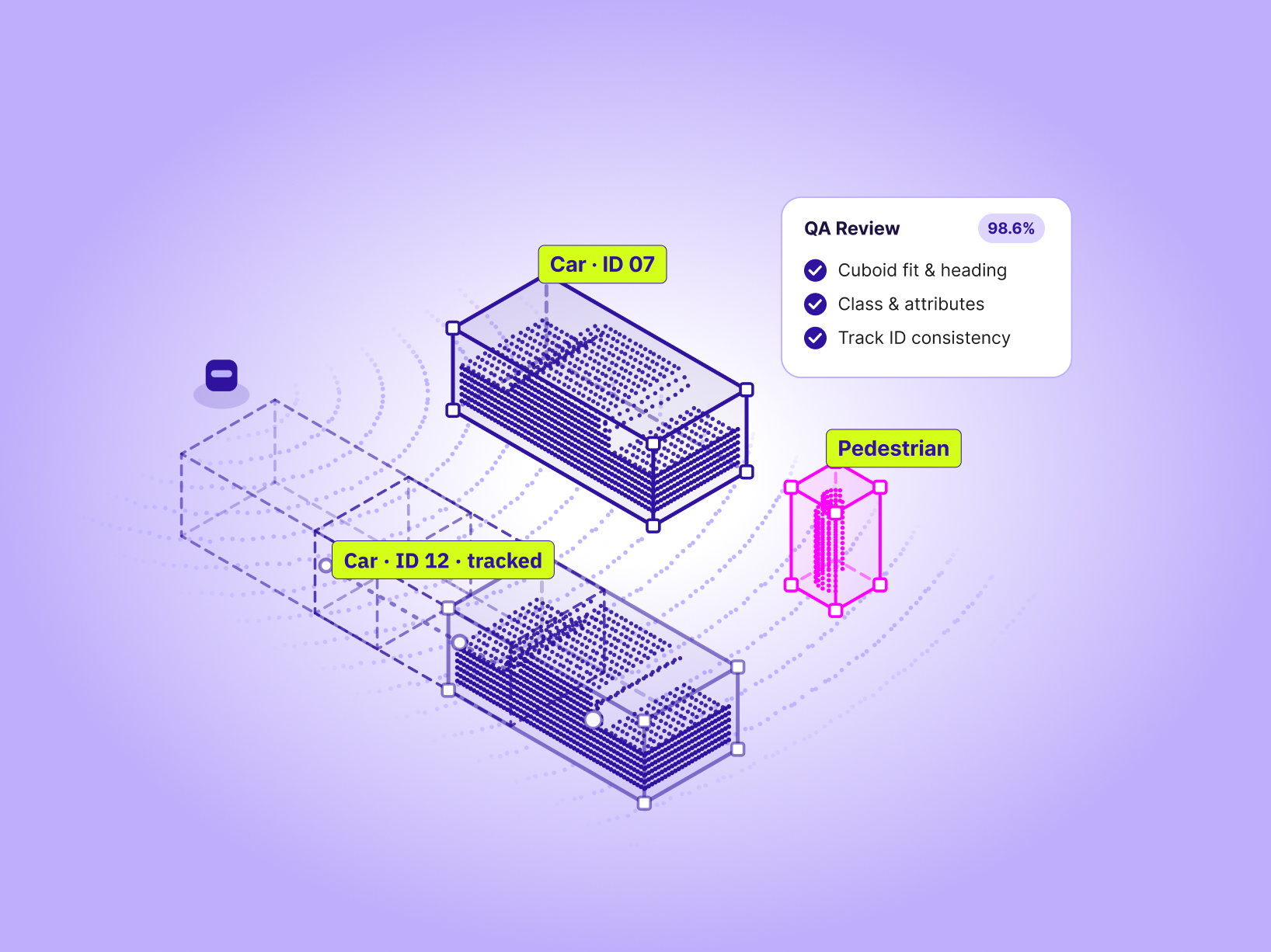
3D point cloud annotation has four main types: 3D cuboids that fix an object's position, size and heading; semantic and instance segmentation that labels individual points; polylines and polygons for lanes and boundaries; and tracking IDs that follow objects across frames.
3D cuboids (3D bounding boxes)
A cuboid captures an object's center, dimensions and heading in one shape, which is why it drives detection and tracking. Position and size can be fit to the visible points. Heading is harder, because direction on a sparse, partly hidden object takes judgment. The nuScenes dataset is built on cuboids: 1.4 million 3D bounding boxes across 23 classes, each with 8 attributes.
If you know 2D bounding box annotation, a cuboid adds depth, height and an orientation to get wrong.
Semantic and instance segmentation
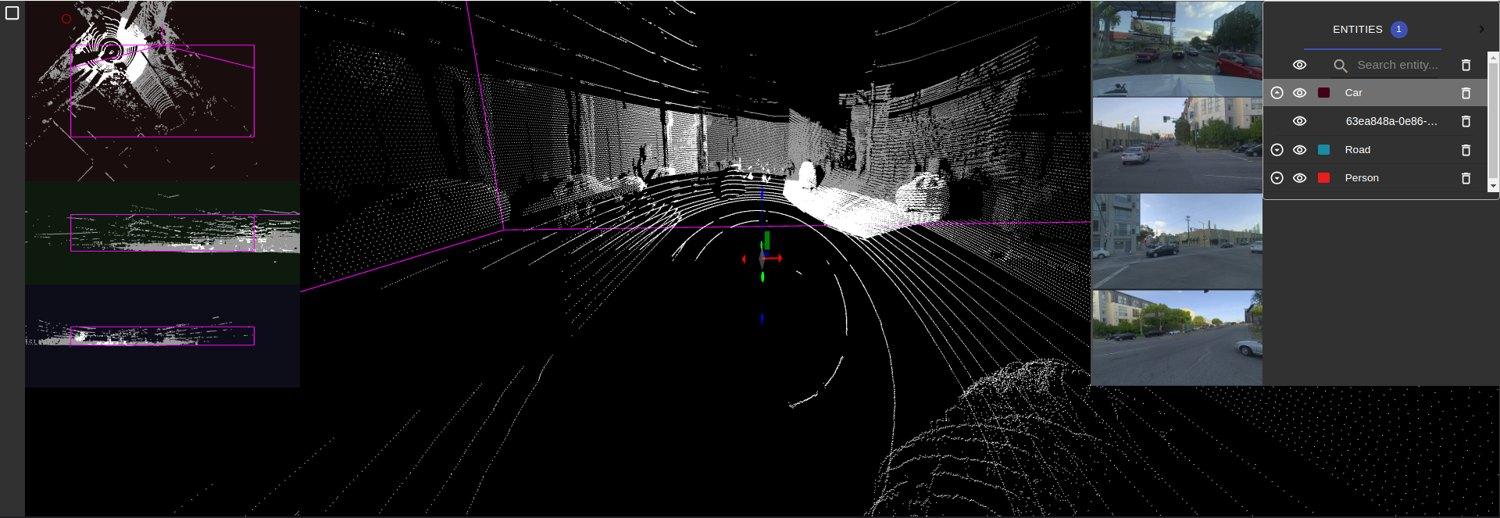
Segmentation labels individual points. Semantic segmentation gives every point a class such as road, sidewalk, vegetation or vehicle, and instance segmentation also separates one car from the next. It costs far more per frame than cuboids because every point needs a decision, so teams usually reserve it for drivable-space work, mapping and scene understanding.
Polylines and polygons
Polylines trace lane markings, curbs and road edges in 3D, and polygons outline regions such as drivable area. They matter most for mapping and path planning, where a model needs the shape of the road, not just the objects on it.
Tracking across frames
Tracking gives each object an ID that persists across frames, which is what lets a model learn motion. The usual workflow is to label keyframes, let the tool interpolate the frames between them, then correct drift. It pays off on smooth motion, while turns, hard braking and cut-ins still need extra keyframes. Our guide to object tracking algorithms shows how models consume those IDs.
Start with a LiDAR proof of concept
Scope a limited set of classes and sequences, agree KPIs and get a go/no-go review before you scale.

How does sensor fusion sync camera and LiDAR labels?
A cuboid is easier to place when you can see the object in the camera frame. Sensor fusion annotation projects each 3D label onto the synchronized camera images, so annotators check one view against the other. Our glossary entry on sensor fusion covers the basics.
Two things have to be true for that to work: Calibration has to be accurate, meaning the transform between each camera and the LiDAR is correct. Timestamps also have to line up closely enough that the object hasn't moved between sensors.
They never line up exactly. A LiDAR spinning at 10 Hz takes 100 milliseconds per revolution, and a car at 20 meters per second travels 2 meters in that time. Your spec should say which timestamp wins, and annotators should know that a small projection offset on a fast object is expected, while the same offset on a parked car points to calibration drift.
Pro tip: Check projection on ten random frames before the project starts. A consistent offset means calibration, not annotator error, and it's far cheaper to find in week one than in QA.
What labeling rules do you need for occlusion, sparse points and ego-motion?
Most disagreements between annotators are not skill gaps. They are gaps in the spec. Write the rules below before the first batch, with example frames for each, because annotators will invent their own otherwise.
Labeling rules for 3D point cloud annotation
Taskmonk's warehouse robotics LiDAR project shows rules like these working at volume: 680,000+ point cloud frames across 15,000 scenarios and 35+ classes. Our team ran blind dual annotation on 25% of frames to set ground truth on ambiguous objects, and held weekly calibration sessions on new classes and edge cases. Reported agreement reached 0.87 IoU on bounding boxes and 0.81 mIoU on semantic segmentation, and average handle time fell from 18 to 6.5 minutes per scene.
Pro tip: Version your spec. Put a date and version number on the rules document and tag each batch with the version it was labeled under. When a rule changes mid-project, you'll know exactly which frames need relabeling.
Which QA metrics work for 3D labels?
2D IoU doesn't carry over cleanly to 3D labels, so measure the geometry directly. The nuScenes benchmark matches detections to ground truth by center distance at thresholds of 0.5, 1, 2 and 4 meters, then reports translation, scale, orientation, velocity and attribute errors separately. The authors chose center distance over IoU because IoU punishes small objects such as pedestrians heavily for small localization errors.
For labeling QA, the same idea applies. Compare each annotator's cuboid to a reviewed or ground truth cuboid and track:
- Center offset: the distance between the two cuboid centers, in meters.
- Size error: the difference in length, width and height.
- Heading error: the angle between the two headings, in degrees.
- 3D IoU: volume overlap, useful as one summary number once the other three look healthy.
- Class and attribute accuracy: including occlusion level and visibility.
- Track consistency: ID switches and gaps across a sequence.
- Per-class point IoU: for segmentation work.
Where review effort goes matters as much as the metric. Sample by risk, not evenly: new annotators, new classes, night and rain scenes and crowded frames need more review than empty highway. A ground truth set of pre-labeled frames, mixed into normal work without annotators knowing, gives you an accuracy number that doesn't depend on a reviewer's mood.
Pro tip: Break heading error down by class. A cluster of 180-degree flips on parked cars means the spec doesn't say which end is the front, and that's a spec fix, not an annotator fix.
See what 3D annotation QA costs at your volume
Platform and annotation services pricing, so you can compare a platform-only setup with a managed team.
Which 3D point cloud annotation tools and services should you compare?
Read the “Who annotates” row first. With a platform only, you bring annotators, write the spec and run QA. With a managed service, the vendor supplies trained annotators and runs QA against your spec. A hybrid keeps the platform and your ownership of the spec, and hands production volume to a managed workforce.
The core 3D point cloud annotation tools look alike across all four, so the differences show up in segmentation depth, QA and delivery. CVAT Online is free to start, with paid plans from $23 per user per month on yearly billing, and Taskmonk’s platform is $60 per active user per month with unused seats never billed.
That makes CVAT the sensible choice when you have engineers to run it and a small, well-defined label set. Taskmonk isn’t the right pick if you only need a free tool for a few hundred frames. It’s built for sustained production work, where QA, annotator routing and volume are the actual problem.
For platform-by-platform comparisons across video and AV data, see our guide to the best video annotation tools for autonomous vehicles. Teams weighing free options can start with our open-source image annotation tools roundup.
How does Taskmonk handle 3D point cloud annotation?
Most 3D programs stall in the same place. The tool is fine, but cuboid quality drifts as the team grows and nobody can see it drifting. Taskmonk is built around that gap, with the 3D tooling and the QA layer in one platform.
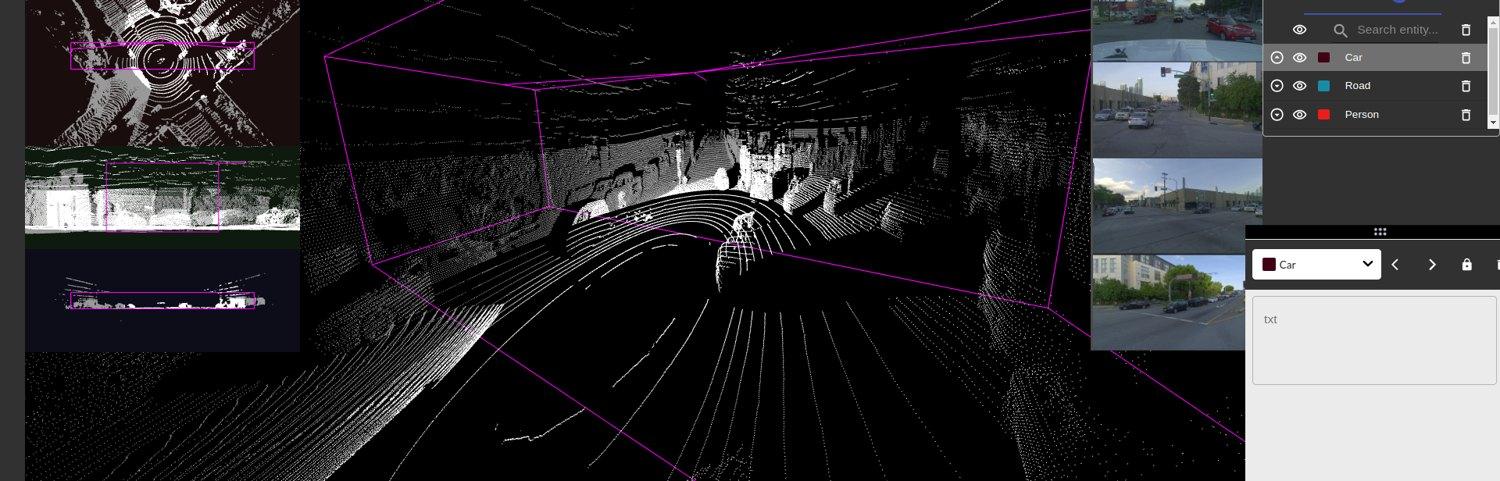
3D tooling built for sensor fusion: Annotators work in top, side and front views with synchronized camera feeds, and can draw directly in the camera view while the annotation is projected into 3D. The 3D cuboid tool has orientation control (Shift+O turns a cuboid 90 degrees), and the editor adds polyline, polygon, cylinder with auto-fit, keypoint and segmentation tools. Interpolation and frame-wise tracking keep object IDs stable across frames, and a merged point cloud view helps with static objects.
QA review with adaptive sampling: The QA review stage runs in two modes: approve or reject, or edit the label directly (Maker-Checker and Maker-Editor). Adaptive sampling, built on Taskmonk's DynamicPercentageRule, routes tasks to review based on each annotator's rolling accuracy over the past month, within sampling bands you set. Ground truth benchmark tasks (Golden Data) are mixed in blind, and consensus labeling (Majority Vote) covers classes where annotators disagree.
A clarification workflow for ambiguous frames: Annotators can raise a question to a designated clarifier before they submit, so a half-hidden object gets a ruling instead of a guess. Rejections carry a required reason, and annotators can respond with a rebuttal, with the full history visible to both sides.
Managed workforce with affinity routing: Predefined affinity routes tasks by a field value, such as scene type or class set, to designated annotators, so the people who know the spec handle the hard frames.
Taskmonk has run 800M+ labeling tasks, works with 10+ Fortune 500 teams and holds a 4.6 out of 5 rating on G2. In a warehouse robotics LiDAR program, a 45-person annotation team labeled 680,000+ point cloud frames in 11 months.
If you run perception data for an autonomous driving, robotics or mapping program and need 3D labels at production volume,
book a demo with the Taskmonk team.
You'll walk through your sensor setup, label classes and QA targets, and leave knowing whether a platform, a managed team or a hybrid fits.
Conclusion
Most 3D labeling problems get blamed on the annotators or the tool. Look closer and they’re usually decisions nobody made: how much of a half-hidden truck to box, how few points still count as an object, which timestamp wins when the camera and LiDAR disagree. Each undecided rule turns into thousands of cuboids that look fine alone and conflict in aggregate.
Teams that avoid this settle those questions before the first batch and put them in a versioned spec with example frames. They check projection on a handful of frames in week one, review by risk instead of evenly, and watch heading and center error by class. A spec gap then shows up as a pattern within days, not as a relabeling bill in week six.
Before your next batch goes out, write down the rules your annotators are most likely to argue about. Everything else in the pipeline gets easier once those are settled.
Frequently asked questions
What is the difference between 3D point cloud annotation and 2D image annotation?
2D annotation labels pixels in a flat image. 3D point cloud annotation labels points in space, so you also set depth, height and heading, and you often work from several views at once. It's slower per object, and it's the standard way to give a model exact distance to an obstacle.
Can 3D point cloud annotation be automated?
Partly. Interpolation and model-generated pre-labels remove repetitive work on smooth motion, but people still fix heading, occlusion and rare classes. Treat automation as a way to cut annotator time per frame, and keep human review on every class your model hasn't seen enough of.
What file formats do 3D point cloud annotation tools accept?
Common point cloud formats include PCD, PLY, LAS and LAZ, plus the binary files used by the KITTI dataset, usually paired with calibration files and camera images. Supported formats vary by tool, so confirm yours before you commit. If your data sits in a ROS bag or a sensor-specific format, plan a conversion step. Taskmonk exports PCD, PLY, KITTI and nuScenes schemas.
How many points does an object need before it gets labeled?
That's a spec decision, and it should be set per class. The nuScenes annotation rules keep labeling an object as long as at least one LiDAR or radar point falls on it. A higher threshold can save effort if your model will never be asked to detect objects at that distance, but write the number down and apply it to every annotator.
Are free or open-source tools enough for 3D point cloud annotation?
For small projects with a stable label set, often yes. CVAT, for example, supports 3D cuboids and interpolation at no license cost. What you take on is everything around the tool: hosting, annotator management, QA and guideline upkeep, which is where costs show up once volume grows.
How long does it take to annotate a 3D cuboid compared with a 2D box?
Longer, because the annotator sets position, size and heading from several views, and sparse objects need extra checking. Sequences recover part of that time through interpolation. In Taskmonk's warehouse robotics project, interpolating labels across 8 to 15 intermediate frames cut manual effort by 58%, according to the case study.