Audio annotation is how you turn recordings into training-ready examples by tagging what happens when, such as the spoken words, speaker turns, sound events, and the intent or outcome tied to the clip.
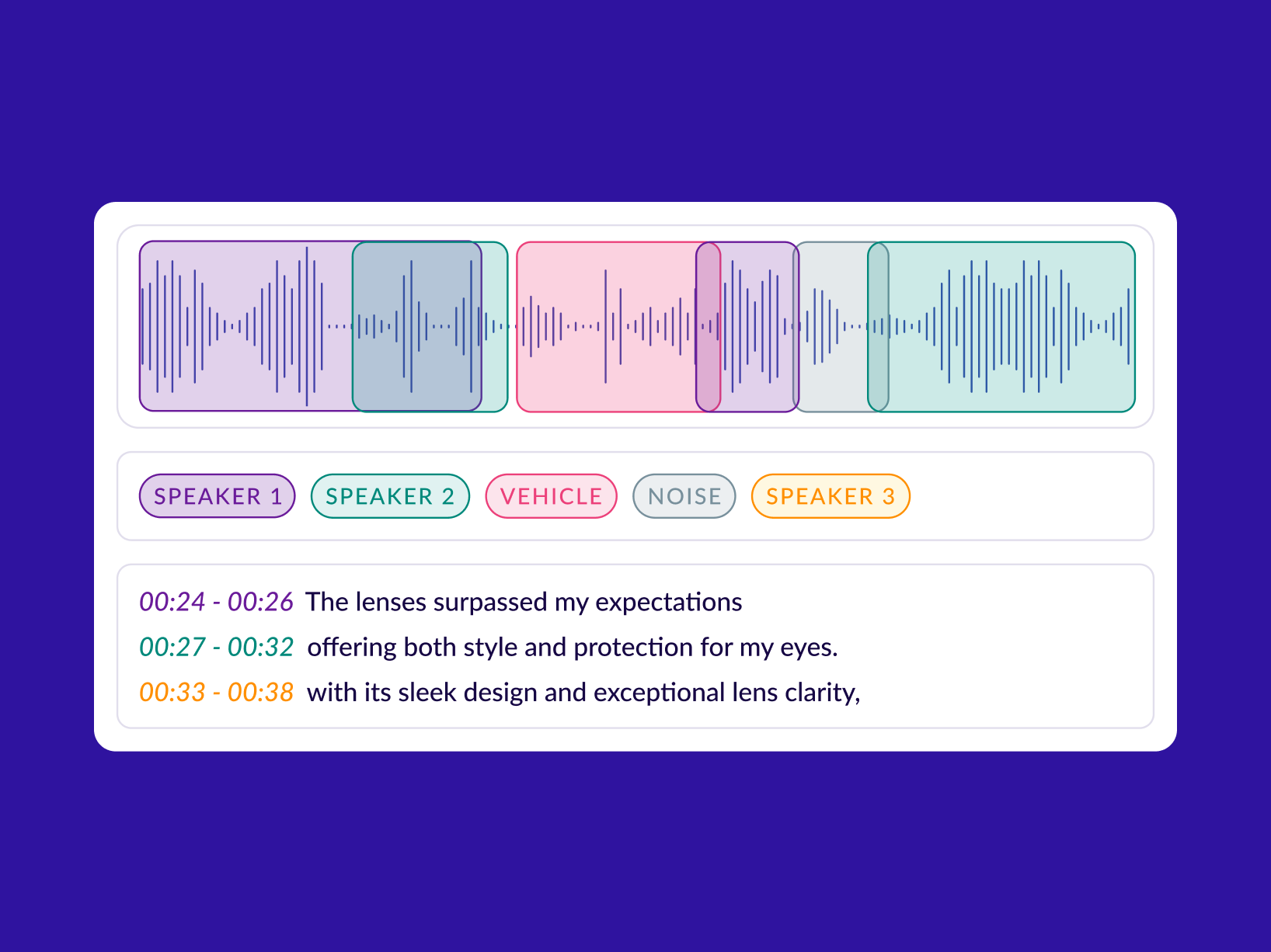
Most projects use a set of repeatable tasks: transcription, timestamping and segmentation, speaker labeling (who spoke when), sound event tagging (alarm, horn, cough, machine noise), and call-level labels like intent, resolution, or compliance.
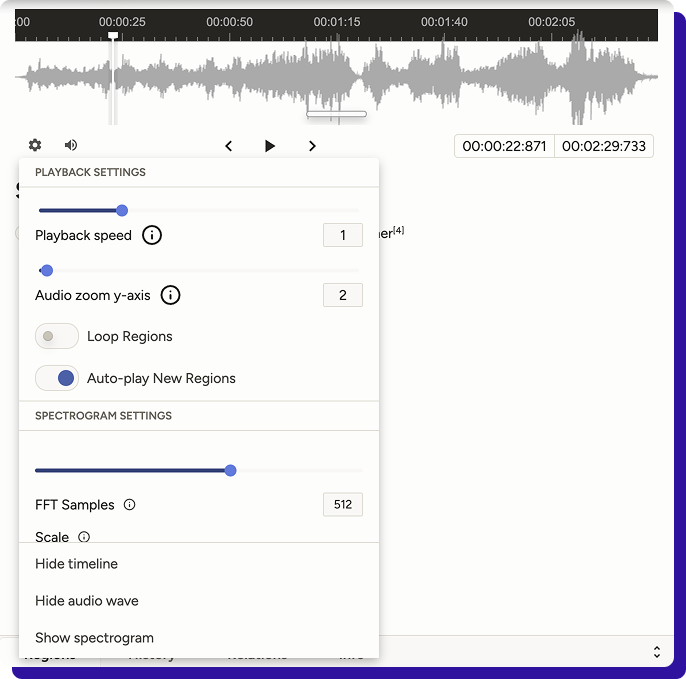
Audio annotation starts with understanding the audio data. Digital audio is basically a signal over time: a waveform (amplitude values changing over time) that’s often viewed as a waveform display or a spectrogram to help annotators spot patterns, boundaries, and regions worth labeling.
That time-based nature is what makes audio annotation tricky. Unlike static images, audio isn’t self-contained; you often need to listen forward and backwards because context changes meaning.
A pause could be hesitation or turn-taking. A half-word could be a pronunciation variation or a cutoff. Two speakers can overlap, and both still matter.
Even non-speech sounds like laughter or keyboard clicks can be relevant depending on what you’re training.
This is why good audio annotation is less about labeling isolated moments and more about labeling the temporal flow of audio: how speech and events begin, overlap, and resolve over time.
If your guidelines don’t capture that temporal logic, you don’t just get noisy labels; you get a dataset that teaches inconsistent rules.
How is audio annotation used in AI?
Audio annotation converts raw recordings into examples a model can learn from. A model cannot learn from “a 3-minute call” or “a noisy clip” in the way humans do. It learns from structured targets: words with timestamps, speaker turns, event labels, or a clip-level outcome.
Once those targets are consistent, you can train (and evaluate) systems for speech, voice, and sound understanding.
Here’s how it’s typically used across AI workflows:
Training speech-to-text (ASR) and translation
To build or fine-tune an ASR system, you need transcripts aligned to audio. The simplest format is a verbatim transcript per clip, but production ASR usually benefits from timestamps at the sentence/phrase level. For multilingual ASR or translation, you also annotate the language, script, and, sometimes, romanisation rules.
Output labels: transcript, timestamps, language ID, translation text.
Separating “who spoke when” (speaker diarization)
If your product needs speaker attribution (agent vs customer, doctor vs patient, interviewer vs candidate), diarization labels teach or evaluate models that predict speaker segments. This is essential for call analytics, meeting summaries, and any workflow where “what was said” matters less than who said it.
Output labels: speaker IDs, turn boundaries, overlap markers.
Detecting keywords, intents, and actions
Voice bots and routing systems often don’t need perfect transcripts. They need to reliably detect intent (“cancel plan”, “track order”), entities (order ID), or keywords (safety phrases, escalation triggers). Annotation here is usually clip-level or utterance-level tagging, with optional timestamps for triggers.
Output labels: intent tag, entity spans, keyword timestamps, outcome.
Sound event detection (non-speech audio)
A lot of valuable audio isn’t speech: alarms, glass breaking, gunshot-like pops, machinery faults, coughs, wheezes, sirens, dog barks, etc. Event detection models need examples labeled as “event present” and the times when they occur.
Output labels: event class + start/end times (or frame labels).
Quality monitoring and compliance
In regulated or high-stakes workflows, audio annotation is used to train models that detect anomalies: missing disclosures, prohibited claims, aggressive language, or required steps not followed. Often, these labels are paired with evidence spans (the exact timestamp of when the issue occurred) so reviewers can quickly audit.
Output labels: pass/fail tags, category tags, evidence timestamps.
Building evaluation sets you can trust
Even if you’re not training from scratch, you still need a clean gold set to measure improvements. Audio annotation creates a stable benchmark that helps you answer: did WER improve, did diarization error reduce, did intent accuracy go up, did rare-event recall improve?
Output labels: curated transcripts/turns/events with stricter QA.
Why is audio annotation important now?
OpenAI’s Whisper model demonstrated that training on a huge, diverse supervised dataset (~ 680,000 hours of multilingual, multitask speech data) improves robustness to accents, background noise, and technical language.
But model scale alone does not guarantee reliability.
Reliability instead comes from audio annotation techniques that are consistent enough to teach the model what to do in messy conditions: overlapping speech, partial words, filler sounds, code-switching, or long-form audio where boundaries matter.
At the same time, voice is being pushed into high-risk environments. Also, synthetic voice fraud is no longer theoretical. Recent reporting highlights scammers using AI-generated voices for phone scams and impersonation, with real monetary losses.
ElevenLabs recently published a safety framework for voice agents that focuses on guardrails like content safety, identity constraints, privacy boundaries, and escalation behaviour.
In practice, those guardrails often depend on labeled training and evaluation sets: examples of disallowed requests, PII moments, consent language, escalation triggers, and how an agent should respond.
When “voice can be faked,” products that rely on audio increasingly need detection, verification, and audit trails, which again comes back to high-quality labeled datasets and evidence timestamps.
Audio Annotation purpose
Audio annotation exists to convert messy, time-based sound into ground truth that your models and evaluations can actually use.
At a practical level, that means
Turning audio into aligned targets such as time-stamped transcriptions, speaker turns, and sound-event spans (because audio is temporal, not static), and
Making the dataset inspectable and sliceable allows you to curate coverage across accents, noise conditions, speakers, and recording setups before labeling.
Backbone for quality control, including clear annotation protocols, edge-case examples, multi-level reviews, and measurable checks, such as inter-annotator agreement, to maintain consistent labels as teams scale.
Closes the loop for iterations: you compare model predictions against ground truth, identify systematic misses (overlap, long-form boundaries, domain terms), and feed those edge cases back into the next labeling batch, rather than guessing what changed.
Audio Annotation techniques
Audio annotation techniques are the operational methods teams use for consistent labeling on time-based audio, especially when multiple annotators or vendors are involved.
They define how you structure layers, handle overlaps and boundaries, enforce labeling guidelines/rules, speed up labeling safely, and prevent drift through QA.
Tiered (multi-layer) timeline annotation
Annotate on a time axis using separate tiers for different label streams (for example, transcript, speakers, sound events, notes). This keeps labels clean, allows overlaps, and makes review simpler because each tier has one job. Tools like ELAN are built around this multi-tier model.
Overlap and interruption handling
Define a strict way to represent crosstalk and interruptions: allow concurrent regions across tiers (two speakers active at once) or explicitly mark overlap regions. Without this, two annotators will “choose” different dominant speakers, and you end up with contradictory ground truth.
Boundary rules (segmentation discipline)
Set rules for start/end boundaries: how much leading/trailing silence to keep, minimum segment length, how to treat long pauses, and how to split long-form audio. These small decisions determine whether labels stay consistent across batches and vendors.
Controlled vocabularies + schema constraints
Restrict label values to an approved set (for example, event classes, speaker roles, uncertainty tags) and enforce consistent naming. ELAN supports controlled vocabularies across tiers, which is a practical way to prevent label drift, such as “bg_noise” vs “background-noise” vs “noise”.
Forced alignment for timestamps
Use alignment methods to map corrected transcript text to audio for consistent word/segment timing, rather than relying on manual timestamping. This is widely used in modern speech pipelines because it scales and standardises timing, but it still requires spot checks in noisy audio.
Model-assisted pre-labeling + human correction
Generate first-pass labels with ASR/event models (and sometimes auto-segmentation), then have annotators correct and reviewers validate. This speeds up throughput when baseline models are decent, while keeping humans responsible for the final ground truth.
QA techniques to prevent label drift
Use systematic QA, not random review: gold-set items mixed into batches, inter-annotator agreement checks on sampled slices, maker-checker routing, and targeted audits of known failure modes (overlap, accents, noisy channels). These methods are commonly discussed in annotation quality literature and are what keep datasets stable at scale.
Conclusion
Voicetechnologies are scaling fast, and the rules around accuracy, safety, and compliance are tightening, which puts dataset quality and auditability under the spotlight.
One reason the stakes are rising is scale: the speech analytics market alone is already counted in the billions of dollars and projected to grow fast over the next few years.
At the same time, industry commentary is getting more direct about compliance, with examples like the FCC clarification that AI-generated voices need prior written consent under TCPA guidelines being cited as a turning point for how voice AI gets deployed.
For organizations building conversational AI systems, high-quality audio annotation techniques are no longer optional. They are the foundation that enables reliable speech recognition, intent detection, and sound event modeling.
If you’re building speech models or conversational AI, Taskmonk helps you ship production-grade audio datasets with workflows for transcription, speaker diarization, timestamp-based segmentation, and intent labeling, plus multilingual coverage.
Also cut manual effort using auto transcription + pre-segmentation (Whisper + Google models) and keep output consistent with robust QA.
FAQs
What is audio annotation (and how is it different from transcription)?
Audio annotation is broader than transcription: it can include transcripts, timestamps, speaker turns, and sound-event labels. Reddit engineers often describe it as “timeline ground truth,” not just text.
Do I really need timestamp-labeled speech data for ASR?
Only if your workflow depends on time, for subtitles, search, or clip extraction, timestamps matter. Reddit threads repeatedly point to forced alignment tools when boundaries are needed.
What’s the fastest way to get word-level timestamps from transcripts?
Use forced alignment (or alignment-enabled pipelines like WhisperX/MFA-style tools) after the transcript is corrected. Builders on Reddit recommend alignment when you need reliable word boundaries at scale.
Why is speaker diarization still messy in real projects?
Because “who spoke when” breaks down with overlap, short turns, and wrong speaker-count assumptions. Reddit discussions mention inconsistent speaker counts and attribution errors as the most common diarization failure modes.
How do I handle overlapping speech in audio annotation guidelines?
Do not force a single “dominant” speaker. Define an explicit overlap rule (e.g., concurrent regions or overlap tags) and make it a review checkpoint, since overlap is where labels diverge the fastest.
What’s the most practical QA setup for audio annotation at scale?
Use a gold set + reviewer gates, then audit known failure slices (overlap, noisy clips, accented speech). Reddit threads on diarization and alignment show these slices are where pipelines degrade.