


Document AI: Techniques, Workflows & Use Cases (2026 Guide)

Introduction
Every organization runs on documents—PDFs, scans, forms, emails, invoices, contracts, and statements that change without warning. Despite years of “automation,” much of this work still depends on manual fixes, spreadsheet patches, and small corrections that never get logged.
These hidden steps slow teams down, introduce inconsistencies, and create data debt that affects accuracy, compliance, and reporting.
Traditional OCR helps make documents searchable, but OCR for documents does not deliver the structured, validated data that modern systems need.
Rules-based tools and early intelligent document processing (IDP) solutions lift key fields, but often break when formats shift or when workflows require document classification, entity extraction, or document annotation beyond simple templates.
Document AI bridges that gap. It interprets layout, understands document type, extracts fields and tables, performs named entity recognition, validates results, and routes only uncertain items through a human-in-the-loop review.
The outcome is not a text dump—it’s grounded, auditable data ready for ERP, CRM, claims, or AI document management systems.
This 2026 playbook explains how AI document processing and AI document analysis work in practice: the techniques, workflows, versioning patterns, and quality controls that raise accuracy, improve straight-through processing (STP), and keep results stable as volumes grow or document formats evolve.
TL;DR
Document AI converts unstructured documents into structured, validated, audit-ready data. This guide explains the techniques, workflows, and governance required to improve accuracy, reduce manual review, and scale document processing automation across finance, insurance, e-commerce, and compliance.
What is Document AI?
Document AI is a set of models and workflows that convert unstructured documents into structured, grounded, and auditable data.
Think of Document AI as the grown-up version of OCR. It understands layout, knows the document type, extracts fields and line items, applies checks, and flags only the uncertain bits for a quick look.
What you get as a result isn’t a text dump, but clean fields with provenance and confidence that your systems can post on first pass.
This is how the processing pipeline for a document AI project looks:
Ingestion and normalization → Document classification → Layout-aware OCR → Key-value and table extraction → Entity linking → Validation and confidence thresholds → Human-in-the-loop review → Exports and handoff.
Three pillars that keep Document AI dependable:
- Grounding: links every extracted value to its exact page, region, and text span so reviewers can verify it instantly.
- Confidence thresholds: determine what goes straight through and what needs a quick check.
- Versioning: records datasets, models, rules, and exports so results are reproducible and audits stay routine.
Document AI vs. OCR vs. IDP
OCR (Optical Character Recognition)
OCR turns pixels into text. It spots characters and words, keeps a basic reading order, and gives you a text layer you can search.
Helpful, but it stops there. OCR will not tell you that “Total” should equal the sum of line items, or that a date is in the wrong format.
IDP (Intelligent Document Processing)
IDP adds structure on top of OCR. It can sort files by type, pull out key fields, and lift simple tables. Many teams start here for predictable forms such as utility bills, pay slips, or standard GST invoices.
You usually get some rules and a light review step, which works well until layouts drift or handwriting shows up.
Document AI.
Document AI is the full program. It reads layout, classifies the document, extracts fields and line items, links entities like vendor names and policy numbers, and checks results against business rules.
It uses confidence thresholds to decide what passes and what needs a quick review. Every value is grounded to a page and text span, and releases are versioned so you can reproduce them later.
The goal is not a one-off parse. The goal is straight-through processing with an audit trail.
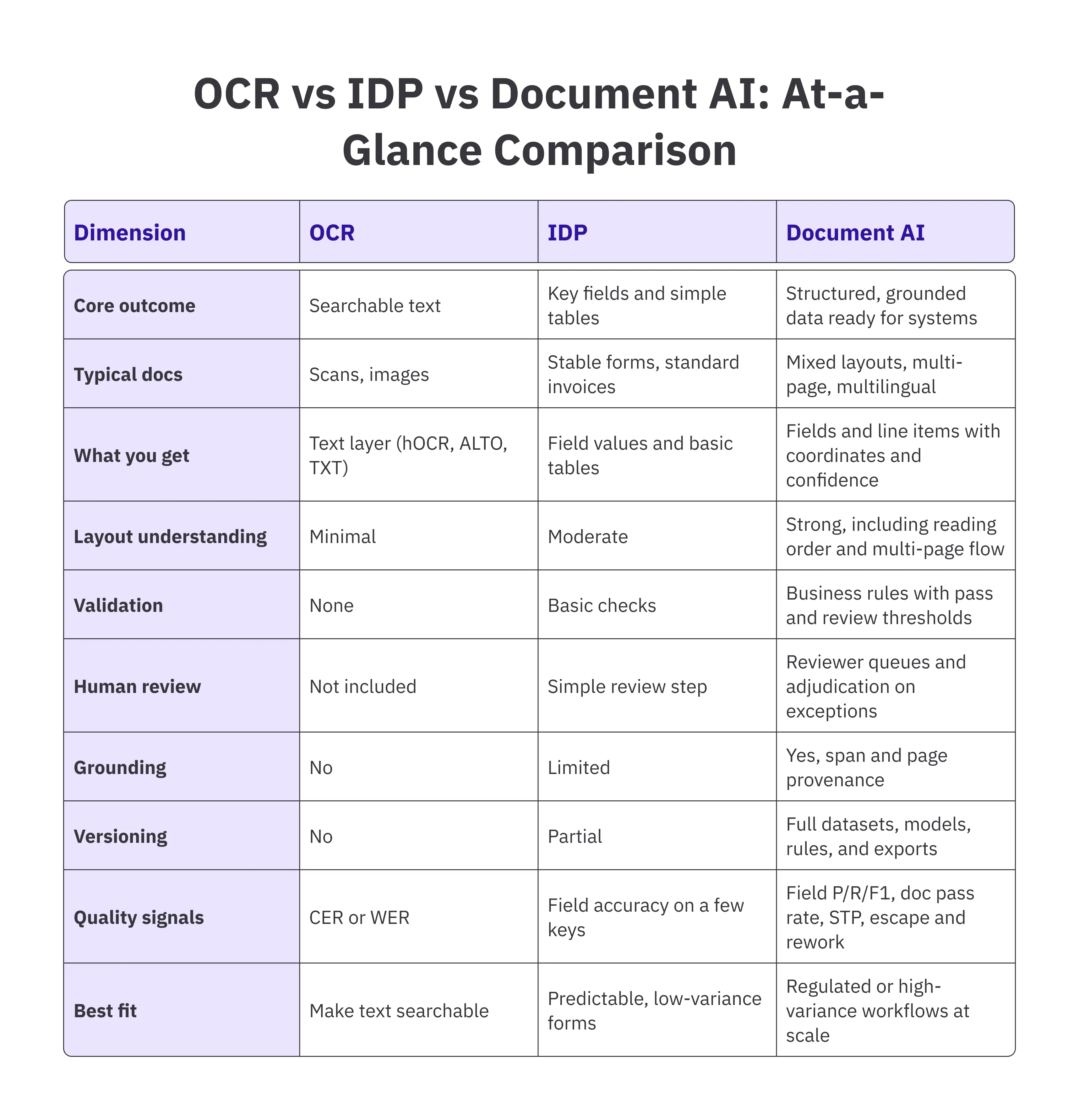
Here is a quick comparison table of OCR, IDP, and Document AI across the dimensions practitioners care about
Techniques of Document AI
These are the core methods that turn messy PDFs into structured data your systems accept on first pass. Use them to design AI document processing that pairs strong extraction with human-in-the-loop review, clear QA, and reliable document versioning.
High-impact use cases for Document AI
These are the workflows where Document AI and AI document processing move the needle fastest. Each use case includes the industries where it creates visible gains.
Invoice and Accounts Payable Automation
Turn mixed-quality invoices into clean vendor, date, tax, currency, and line-item data that posts without hand edits. Totals and tax checks run before export; only uncertain fields land in a small review queue. Teams see fewer “parked” items and steadier month-end close.
Industries and why it helps:
- Manufacturing: thousands of suppliers, multi-currency parts, frequent surcharges.
- Retail & e-commerce: volatile volumes and ever-changing layouts from new vendors.
- Logistics & transport: accessorial fees and fuel adjustments inside long tables.
- Energy & utilities: meter-based charges and site-level billing.
- Professional services: billable hours, expenses, and multi-page statements.
KYC and Customer Onboarding
Sort IDs and proofs, lift names, dates, addresses, and document numbers, and cross-check against master records. Glare, handwriting, and partial crops trigger a quick human-in-the-loop pass; clean files flow straight through.
Result: shorter onboarding and cleaner audit trails.
Industries and why it helps:
- Banking & fintech: faster account opening with fewer “pending” cases.
- Insurance: identity verification tied to policy issuance.
- Telecom: high-throughput SIM and broadband sign-ups across regions.
- Brokerage: regulatory checks during account creation.
Claims Processing
Pull policy numbers, claimant details, dates, codes, and amounts from claim forms, estimates, and bills. Totals and code logic run upfront, so adjusters see only true exceptions. Cycle time drops; status updates go out sooner and with fewer corrections.
Industries and why it helps:
- Health insurance: dense multi-page statements and code sets.
- Auto insurance: estimates and repair orders linked to a single claim.
- Property insurance: varied paperwork after storms or fires.
- Travel: multilingual receipts and physician notes.
Contract and Agreement Analysis
Detect contract type, highlight parties, dates, amounts, renewals, and obligations, and flag unusual clauses. Named entity recognition and span grounding show exactly where each value came from, so reviews move faster, and redlines are cleaner.
Industries and why it helps:
- Legal & professional services: consistent summaries at scale.
- Procurement: vendor terms, pricing, and renewal windows in one view.
- SaaS & technology: license rights and SLAs tracked across customers.
- Real estate: lease terms, escalations, and options across locations.
Compliance and Regulatory Reporting
Assemble fields from invoices, statements, and standardized forms into regulated reports. Thresholds, codes, and format rules are enforced before export; every value keeps page and span provenance. Reviews stop arguing sources and start checking substance.
Industries and why it helps:
- Financial services: AML, tax, and statutory filings that must reconcile.
- Healthcare: prior-auth and claims bundles with traceable evidence.
- Public sector: uniform submissions from many agencies.
- Energy & utilities: emissions and safety reporting with auditable lineage.
Intelligent Document Processing (IDP)
Stand up a reusable pipeline- document classification, OCR for documents, entity extraction, confidence thresholds, reviewer queues, and document versioning, so new use cases plug in without rebuilding controls. One shared backbone; many workloads.
Industries and why it helps:
- Banking: the same rails power KYC, statements, and payments.
- Insurance: common reviewers and rules across claims and endorsements.
- Healthcare: consistent handling for forms and prior-auth packets.
- Public sector: centralized guardrails for diverse departmental documents.
Implementation framework for Document AI
A successful rollout is planned, measurable, and repeatable. This framework moves from a clear assessment to a calibrated pilot, then to governed integration and scaling.
Along the way, you track field accuracy (correct entry of target data), document pass rate (percentage of documents processed successfully), and STP (straight-through processing, the rate of documents processed without manual intervention), so results hold up in operations and audits.
How AI-Assisted Labeling Streamlines Document Workflows
AI-assisted labeling with Taskmonk reduces ~90% of the labeling work by combining model suggestions with quick human checks.
The outcome is simple: better accuracy, higher STP, and reviewers spending time only where judgment is needed.
Conclusion
Winning teams treat Document AI as operations, not magic. Clear schemas, well-defined fields, and optimized thresholds transform messy PDFs into data that your systems accept and your auditors trust.
Build Your Document Intelligence Strategy With Taskmonk
Optimize your document workflows and turn unstructured data into an advantage.
Have a use case to solve? Book a demo to discuss
FAQs


.png)
