.png)
Quick answer:
The best DICOM annotation tools for radiology AI in 2026 are TaskMonk, Encord, V7 Darwin, MD.ai, and Labelbox. For medical imaging, prioritize native DICOM/NIfTI support, multi-planar 3D viewing, clinical-expert reviewers, and HIPAA-grade security with audit trails.
TL;DR
- DICOM annotation tools are built for CT, MRI, and X-ray workflows, where volumetric accuracy directly impacts model performance and regulatory approval
- The best platforms go beyond 2D labeling with multi-planar viewing, 3D segmentation, and built-in QA, ensuring consistent, clinical-grade datasets
- What actually differentiates tools at scale is workflow fit: native DICOM handling, structured QA, AI-assisted labeling, and compliance readiness
- TaskMonk stands out with native DICOM support, affinity-based annotator routing, configurable QC workflows, and no-code pipeline setup
- Open-source tools like 3D Slicer and OHIF are suitable for research, but enterprise and regulated AI programs require platforms built for scale, governance, and auditability
Introduction
If you have ever run a CT annotation job where masks were pixel-perfect on slice 47 but completely off by slice 52, you know the problem. Medical imaging AI depends on volumetric consistency. A model trained on drifting labels will fail in validation, and if it makes it to deployment, it will fail where it matters most: on real patient scans.
The cause is usually the same. Teams start with tools built for 2D images and try to force them into 3D workflows. Annotators label slice by slice without cross-plane context. QA happens after export, not during labeling. By the time someone catches the drift, rework has already burned weeks.
There is a better way to set this up from the start but it requires choosing tools built for the problem, not adapted from somewhere else. The platforms that actually hold up are not just viewers with better brushes. They are built around volumetric workflows, structured QA, and compliance controls from the ground up.
This guide covers the DICOM annotation tools built for radiology AI teams where annotation quality directly impacts model performance, regulatory validation, and deployment timelines.
You will see how platforms handle 3D workflows, what QA capabilities they offer, and where the trade-offs show up at scale. If you are building diagnostic AI for CT, MRI, or X-ray, choosing the right image annotation tool is the difference between clean ground truth and expensive rework.
Let's get into it.
What actually makes a DICOM annotation platform "best"?
Most DICOM annotation tools look fine in a demo. The differences show up when you run real workloads with multi-series CT volumes, multiple reviewers, evolving label taxonomies, and repeated exports for model iterations.
A DICOM annotation tool is best when it matches the specific constraints your team faces. An academic research lab annotating 200 brain MRIs has different needs than a startup racing to FDA clearance with 50,000 chest X-rays. The former needs precise 3D segmentation tools and minimal overhead. The latter needs throughput, structured QA, and audit trails that survive regulatory review.
Here is what matters when you are comparing tools:
How to choose a DICOM annotation platform?
Choosing the right platform starts with mapping your constraints. Before you compare tools, answer three questions.
Once you have those answers, filter tools by technical fit. Start with format support. Confirm DICOM and NIfTI compatibility, including multi-frame, enhanced, and secondary captures. Check for MPR display, window, and level presets, and 3D volume review. If the platform requires conversion to PNG or JPEG before labeling, move on.
Validate model-in-the-loop features if you are using AI-assisted workflows. Auto-annotate, active learning, and pre-labelling can reduce manual effort by 40 to 70 percent on high-volume segmentation tasks.
But only if the platform integrates these features into the review loop, not as a separate export-import step.
Evaluate QA depth next. Look for maker-checker workflows, consensus scoring, and slice-level commenting. If your QA process happens after export in a separate tool, you are adding friction and losing traceability.
Pro tip: Run a pilot with your actual data before committing. Upload 10 to 20 studies, configure a simple workflow, and have two annotators label the same cases. The platform that feels fast at 10 studies might become slow at 100. The QA workflow that looks clean in the demo might require too many clicks per disagreement to scale.
Finally, confirm security and integration. Require role-based access, audit logs, encryption at rest and in transit, and SSO if you are in an enterprise context. If you are handling PHI, get the Business Associate Agreement signed before uploading data. For integration, check API and SDK support, webhook availability, and export format compatibility with your ML stack.
Key Features to Look for in Radiology Annotation Tools
When evaluating medical image annotation tools for radiology AI, a few features clearly separate platforms built for medical imaging from those adapted from general computer vision. These features determine whether your annotation program scales efficiently or turns into continuous rework.
These features compound. A platform with native DICOM support but no QA workflows will be faster to start but slower to scale. A platform with strong QA but weak 3D tools will create bottlenecks on volumetric studies. The right tool matches your annotation complexity, team structure, and compliance requirements without forcing you to build missing pieces yourself.
Labeling CT, MRI, or X-ray at scale?
TaskMonk handles native DICOM/NIfTI, multi-planar 3D annotation, and HIPAA-ready QA end to end.

Best DICOM Annotation Tools for Radiology
Here are the platforms and tools most frequently shortlisted by medical AI teams working at scale on CT, MRI, and X-ray annotation. Each entry covers what the tool does well, where it fits, and what to watch for.
1. TaskMonk
.png)
TaskMonk is a managed annotation platform built for enterprise AI teams that need DICOM workflows, structured QA, and annotator operations handled end-to-end. The platform natively supports DICOM and NIfTI, with multi-planar viewing, 3D volumetric annotation, and AI-assisted pre-labelling.
What sets TaskMonk apart is its no-code workflow builder combined with affinity-based annotator routing. You configure annotation tasks, QC stages, and review pipelines without engineering. The platform routes tasks to annotators based on language, dialect, domain expertise, or modality experience. This matters when you are annotating studies that require clinical judgment or region-specific interpretation.
TaskMonk offers three QC methods: Maker-Checker (one annotator, one reviewer), Maker-Editor (annotator drafts, editor refines), and Majority Vote (multiple annotators, consensus aggregation). You choose the method per task type. High-ambiguity cases get consensus review. High-volume repetitive tasks get maker-checker. The platform tracks inter-annotator agreement, rework rate, and turnaround time at the task and annotator level.
TaskMonk has processed 480 million tasks, delivered 6 million labeling hours, and works with 10+ Fortune 500 clients. The platform holds a 4.6 out of 5 rating on G2. Teams building diagnostic AI, clinical decision support tools, and FDA-cleared medical devices use TaskMonk when they need annotation operations managed at scale with clinical-grade accuracy.
Best for: Enterprise AI teams, regulated medical imaging programs, high-volume CT and MRI annotation with a managed workforce, and projects requiring affinity-based routing or consensus QA.
TaskMonk pricing: Platform access is $60 per active user/month, pay-as-you-go and you're billed only for seats actually used that month, with no feature gates, no minimum commitment, and the full platform (multimodal annotation, AI-assisted labeling, custom QA, API) from day one. Enterprise adds proprietary workflows, private-cloud/on-prem, HIPAA, SSO, and a dedicated CSM (custom).
Prefer to outsource end-to-end?
Fully managed Annotation Services are scoped per project with a fixed quote before any work begins.More details here
2. Encord
.png)
Encord is an enterprise data platform with dedicated DICOM and NIfTI annotation tools. The platform supports MPR workflows, volumetric rendering, and AI-assisted labeling with interpolation across slices. Encord positions itself for teams working on multimodal datasets where medical imaging is one component in a larger computer vision pipeline.
Encord supports model-in-the-loop workflows. You bring your own model or use Encord's SAM integration for automated segmentation. The platform handles pre-labeling, human review, and export back to training pipelines. Active learning features prioritize high-value data for relabeling based on model uncertainty.
What to watch: Encord does not offer a managed workforce model. You bring your own annotators or hire externally. The platform also lacks advanced multi-image synchronization features like simultaneous 16-view DICOM display, which some enterprise radiology teams require for comparative studies. Pricing is usage-based, which can require tighter monitoring as annotation volumes scale.
Best for: Enterprise teams working on multimodal AI projects, organizations needing integrated data ops and annotation, and programs where DICOM is one modality among image, video, and geospatial data.
3. V7 Darwin
.png)
V7 Darwin is a clinical computer vision platform optimized for speed on DICOM and NIfTI workflows. The platform supports native 16-bit DICOM rendering, MPR views, auto-annotate for automated segmentation, and volumetric file management.
Auto-annotate uses V7's proprietary model or MedSAM integration to segment structures within selected regions. Annotators mark a few keyframes, and the system interpolates masks across intermediate slices. The tool works well for repetitive segmentation tasks like organ boundaries or lesion tracking in multi-phase CT studies.
V7 includes collaboration tools like in-image commenting, consensus review, and annotator agreement scoring. The platform tracks productivity metrics and routes tasks through configurable review stages. Exports support Darwin JSON 2.0 and NIfTI formats for training pipelines.
The platform is FDA, HIPAA, and CE compliant. Security features include encryption, SSO, and role-based access. V7 uses usage-based pricing, which requires monitoring as annotation volumes scale. Teams building diagnostic AI for radiology and pathology use V7 when they need fast throughput on volumetric studies with AI-assisted workflows.
What to watch: V7 uses usage-based pricing without fixed monthly tiers, which requires monitoring as volumes grow. The platform does not include a managed annotator workforce, so you need to staff annotation teams internally or through external partners. V7 also lacks TaskMonk's affinity-based routing, which means you manually assign tasks based on annotator expertise rather than having the platform route based on language, modality, or domain knowledge.
Best for: V7 Darwin is best for medical AI teams prioritizing labeling velocity, projects with heavy auto-annotate usage, and clinical workflows needing radiology-style MPR controls.
4. MD.ai
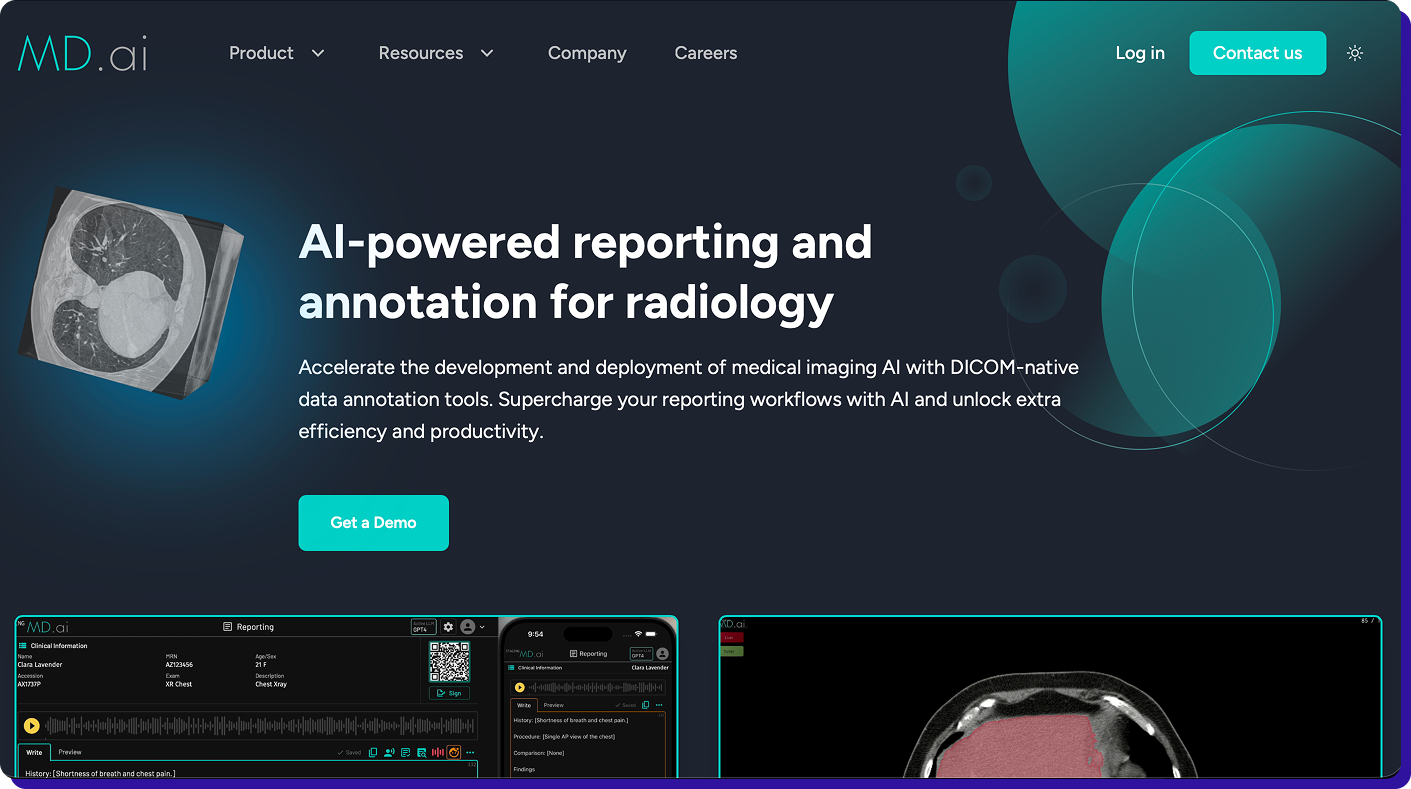
MD.ai is a radiology-native platform designed for academic and hospital radiology teams. The web DICOM viewer mimics PACS reading layouts with hanging protocols, measurements, ROI tools, and structured annotation templates. The platform supports multi-reader workflows and consensus reviews with audit logs.
MD.ai is built for teaching sets, cohort curation, and clinical research workflows. The platform exports annotations to research and model training formats. A 510(k)-cleared viewer option is available for clinical use cases.
The platform fits hospital radiology departments and academic centres that value reading-room ergonomics and structured review processes. It is less focused on high-throughput model training pipelines and more focused on clinical-quality annotation with radiologist oversight.
What to watch: MD.ai is optimized for hospital and academic workflows, not high-throughput commercial model training. The platform lacks AI-assisted pre-labeling, automated interpolation, and model-in-the-loop features that reduce annotation time on large-scale programs. It also does not offer managed annotation services. Pricing and SLA structures can be vendor-specific, so confirm turnaround expectations before committing to large projects.
Best for: MD.ai is best for Academic medical centres, hospital radiology departments, teaching and research workflows requiring radiologist-led annotation.
5. Label Box
.png)
Labelbox is a training data platform with medical imaging support for DICOM, pathology scans, and multimodal datasets. The platform focuses on workflow operations and model iteration rather than radiology-specific viewing. If your pipeline standardizes DICOM into labelable assets, Labelbox handles task management, review workflows, and model-assisted labeling at scale.
Labelbox supports polyline and segmentation annotation types for CT, MRI, and ultrasound. The platform includes a catalog feature for data curation, model evaluation tools, and SDKs for programmatic integration. QA workflows support consensus review and escalation routing.
What to watch: Labelbox is not radiology-native. The platform supports DICOM but lacks advanced features like multi-series viewing, simultaneous multi-plane synchronization, and radiology-specific hanging protocols that TaskMonk, Encord, and V7 provide. Teams often need to preprocess DICOM files and standardize metadata before uploading. Labelbox also does not include a managed annotation workforce, so you handle staffing and training separately.
Best for: Label Box is best for teams wanting a unified training data platform for multimodal projects, organizations with existing DICOM preprocessing pipelines, and programs where medical imaging is one component of a broader computer vision strategy.
How TaskMonk Handles DICOM Annotation?
Most medical image annotation tools hit the same bottleneck: annotation quality drifts as volume scales, QA becomes a manual after-export process, and rework cycles burn weeks.
TaskMonk was built to remove that friction by handling annotation operations end-to-end with structured workflows, domain-matched annotators, and built-in QC.
TaskMonk has labeled 480 million tasks, delivered 6 million annotation hours, and supports 10+ Fortune 500 clients across healthcare, autonomous vehicles, and retail AI programs. The platform holds a 4.6 out of 5 rating on G2. Medical AI teams building FDA-cleared diagnostic tools, clinical decision support systems, and large-scale radiology datasets use TaskMonk when they need annotation operations managed at scale with audit-ready traceability.
If you are building radiology AI and need volumetric DICOM workflows, affinity-based routing, and structured QC with built-in compliance, book a demo with TaskMonk.
The team will run your imaging data through the platform so you can see output quality and workflow speed before committing to anything.
See it on your imaging data.
Book a demo and TaskMonk will run your studies through the platform so you can check quality and speed first.
Conclusion
The cost of choosing the wrong DICOM annotation tool doesn’t show up in demos it hits you months later. Rework from drifting masks, missing QA workflows, and broken exports will slow your entire pipeline while costs quietly stack up. By the time the gaps are clear, switching feels harder than continuing.
Don’t let that happen.
Start with your constraints not feature lists. Map your modalities, annotator workflows, and compliance requirements before you even shortlist tools.
Then validate with real conditions: run a pilot using your actual data, your annotators, and your end-to-end workflow from upload to export to model retraining. If a platform breaks at any stage, it’s not the right fit.
Choose a platform that removes friction at your current scale and your next stage of growth not one that only looks good in a demo.
The right DICOM annotation platform gives you clean ground truth, structured QA, and audit-ready traceability without forcing your team to build workarounds.
If you’re evaluating tools right now, don’t move forward without a real pilot. Test it end-to-end, stress it with your workflow, and validate it against your compliance needs before you commit.
%20(1).png)
Frequently Asked Questions

.png)